





SmartPlan-Contruction Plan Takeoff Software
AGTEK’s SmartPlan is a cloud-connected mobile application that leverages geo-referenced 4D output on your job site, making it an indispensable tool for project managers and estimators.


Geo-Referenced Construction Data in the Palm of Your Hand
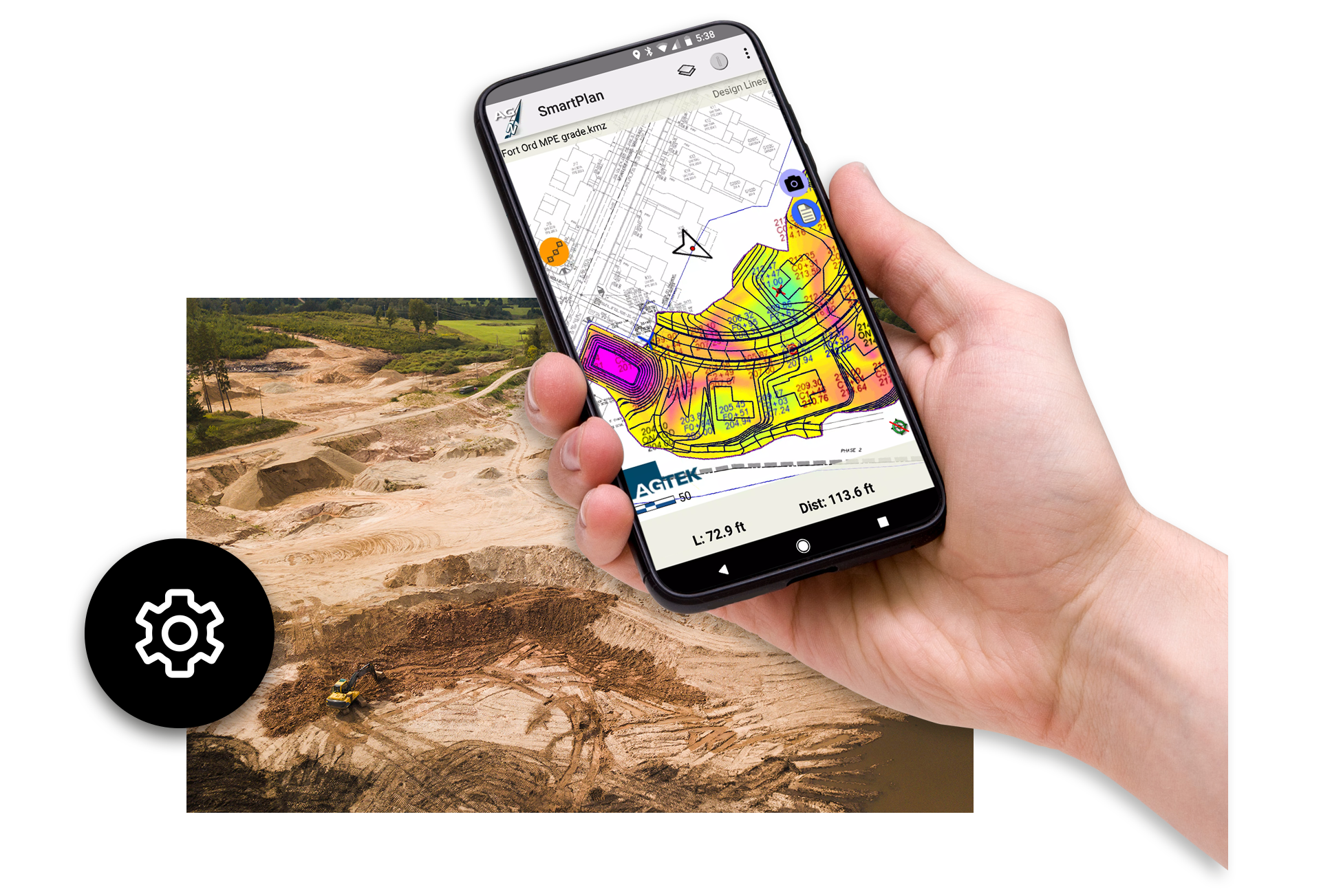
SmartPlan is AGTEK’s cloud-connected mobile solution that puts geo-referenced plan sets, cut-fill maps, and materials takeoffs directly onto your smartphone or tablet. Designed for project managers, estimators, and field crews, SmartPlan uses your device’s GPS to show your exact position on grading plans, paving areas, pipe runs, and report regions—eliminating the need for stakes and improving accuracy across the site.
With SmartPlan, field teams can walk the job with real-time access to earthwork volumes, materials quantities, cross sections, and mass haul diagrams. Users can filter information by material class or phase, ensuring only the most relevant data is displayed. This focused visibility improves decision-making and speeds up communication between the office and field.
SmartPlan also streamlines documentation. Crews can record tracks, measure areas and lengths, capture time-stamped site photos, and add geo-located notes to identify discrepancies or support billing. All documentation syncs automatically through the cloud, making it easy for project managers to review results in Google Earth or import them back into GradeWork. SmartPlan is fully compatible with both iOS and Android devices and integrates seamlessly with AGTEK’s earthwork and materials workflows.
Whether navigating grading limits, calculating progress quantities, verifying paving areas, or mapping utilities, SmartPlan delivers fast, reliable site intelligence that improves productivity, reduces rework, and empowers teams to make smarter decisions.

Features & Benefits

Detailed site data in the palm of your hand

Walk your site armed with a geo-referenced plan set

Earthwork and materials takeoff mapped to your device

Simple on-screen controls select desired regions

Record your tracks as you map out locations of interest

Use the camera to to record your site photos and send back to office

Site plans in the palm of your hand
Walk your site with your cut-fill grid map, plan set, and takeoff quantities mapped into your smartphone or tablet for on-site navigation using the GPS positioning capability built into your Apple or Android device. Without stakes, SmartPlan guides you in closely approximating the locations of grading limits, balance areas, pad corners, slope toes, daylight lines and other plan features, and shows your position on your cut-fill grid map.

Record and measure
Use SmartPlan to record and measure your tracks as you drive or measure areas and lengths to document completed work. Or record milestones and items of interest with SmartPlan’s time-stamped photos. SmartPlan’s dirt-simple data files go to and from the office via the Cloud and display directly on Google Earth.
“SmartPlan gives you the power to turn complex project data into clear, actionable plans. It streamlines our workflows, improves accuracy, and helps the entire team stay aligned from start to finish.”
-AGTEK Support
Customer stories
Hear what our customers think about AGTEK.

PCL working with AGTEK for improved project management
Juan Lopez explains how PCL is using the AGTEK solution from takeoffs to modeling and beyond.

Tilton Excavation working with AGTEK
Tilton Excavation has been an expanding business and AGTEK has become an integral part of their operation.

N.J. Wilbanks Contractors
N.J Wilbanks Contractors explains how AGTEK’s technology provides practical benefit in the field and office.
SmartPlan Frequently Asked Questions
SmartPlan is a mobile, GPS-enabled construction app that delivers geo-referenced plan sets, cut-fill maps, and materials takeoffs to your smartphone or tablet.
SmartPlan uses built-in GPS to display your exact position on graded areas, paving zones, pipe routes, and cut-fill grids, eliminating the need for physical stakes.
Yes. SmartPlan displays color-coded cut and fill regions and allows users to review volumes by station or region.
SmartPlan displays materials by class and phase, including paving areas, pipe lengths, utility trench volumes, and more.
Yes. Crews can measure areas, calculate quantities placed, and save reports for progress tracking and billing.
SmartPlan supports geo-located notes, photos, and track logs, ensuring accurate field documentation.
All tracks, photos, notes, and measurement reports sync through the cloud and can be viewed in Google Earth or imported into Gradework.
SmartPlan imports and exports KMZ files, enabling direct review of photos, tracks, and site reports inside Gradework.
Yes. The built-in measure tool allows users to tap around an area or select points to determine lengths, areas, or quantities.
Users can quickly outline completed work and generate material reports for heavy-duty paving, light-duty paving, pipe runs, and trench volumes.
SmartPlan’s “Tracks” feature records user movement to trace boundaries, map haul paths, or document site features.
Estimators can send streamlined, role-specific datasets to the field, ensuring clarity and reducing communication errors.
SmartPlan reduces rework, improves accuracy, enhances collaboration, and provides real-time site intelligence that accelerates project delivery.

Training and Support at Your Fingertips
Get the most out of your AGTEK tools. Choose from web-based trainings or in-person classes for beginner, intermediate, or advanced learners. Our Community is here for you 24/7 with downloads, manuals, Tech Tips, and more.
Get in touch with our team
Let us know if you have questions about AGTEK sales, training, or products. A representative will be in touch soon.
-
 Connect with an AGTEK expert
 -
 Get your questions answered fast
 -
 Schedule a strategy call
 -
 Start winning more jobs with AGTEK