




Trackwork-A Cloud Connected Production Management System
Trackwork optimizes earthwork, models production, and monitors progress in real time to aid in scheduling equipment, supervising operations, and reconciling bid estimates.


Smarter Earthwork Haul Planning & Production Tracking
Trackwork is an advanced add-on module to Gradework designed to help contractors plan, measure, and optimize earthwork hauling and machine production. Trackwork streamlines the full haul-planning workflow—allowing users to estimate cost hours, analyze machine performance, and compare planned production to actual field results using autonomous GPS machine tracking.
Trackwork includes five powerful modes: Track Plan, Track Analysis, Haul Report, Status Report, and Print View. In Track Plan, users follow a step-by-step guide to plan hauls with precision. Contractors can export job data to Google Earth, trace cut and fill areas, define haul paths, and calculate average haul lengths. By entering machine load times, spread times, yards per load, and minutes per hour, Trackwork automatically computes total cost hours for each haul. As hauls are staged and completed, the system summarizes total cost hours for the entire project—supporting accurate bidding, scheduling, and production planning.
Track Analysis brings real-world performance into focus by importing GPS machine tracks directly from autonomous tracking devices. Users can replay machine movement, visualize active time, insert breaks, measure speeds, and create statistical zones to evaluate load and spread areas. Trackwork also analyzes grading areas, average pass widths, cycle counts, and truck transfers—making it easy to compare actual productivity to planned quantities.
All Trackwork reports can be printed or exported to Excel for project documentation and performance tracking.
Trackwork gives contractors the insights needed to plan smarter, track production accurately, and reduce earthwork costs—turning planning and tracking into a unified workflow.

Features & Benefits

Plan hauls by encircling areas of cut and fill on interactive grid maps

Report time and motion for scrapers, dozers, or other equipment during construction

Provide the field supervisor with access to immediate, actionable track information

Comparing cumulative track data to your production model

Plan your hauls by encircling areas of cut and fill on Trackwork’s interactive grid maps. Indicate your proposed haul paths and specify nominal load volumes and cycle speeds for the assigned equipment and Trackwork will simulate the dirt movement and budget the machine hours.

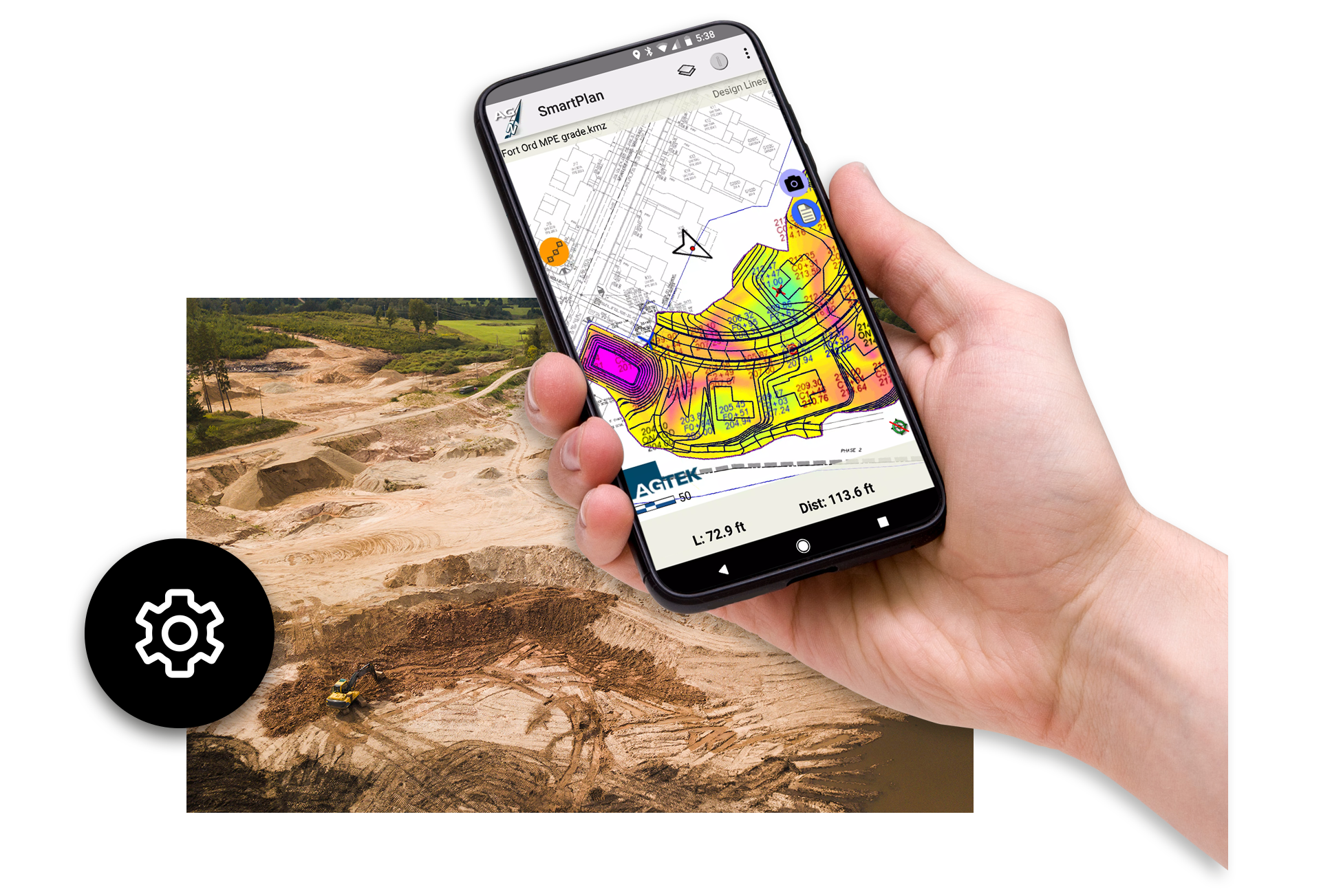
During construction, magnetically-mounted cell-sensors report time and motion for scrapers, dozers, compactors, blades, excavators, trucks or other equipment. Trackwork’s Cloud-connected mobile app provides the field supervisor with access to immediate, actionable track information on load counts, cycle times, haul speeds, moving-time-per-cost-hour and equipment location.

Close the loop between office and field
Comparing cumulative track data to your production model shows percentage completion, work time remaining, and performance to plan. Resolving variances identifies issues and opportunities.
“Trackwork has become a vital tool for Elder’s field and office teams, enabling seamless communication and accurate reporting across projects. With AGTEK, we’re not just tracking progress—we’re optimizing it.”
– Elder Corporation
Customer stories
Hear what our customers think about AGTEK.

Elder Corporation managing production with Trackwork
Shawn Swygman of Elder Corporation takes a deep dive into their use of AGTEK, specifically the Trackwork module.

WL Contracting – Working with SmartTrack
Hear how SmartTrack displays provide real time equipment tracking from simple 4D Sensors.

Moving to AGTEK – Williams Dirt Services
Jenny Williams discusses her experience migrating to and working with AGTEK.
Trackwork Frequently Asked Questions
Trackwork is an add-on module to AGTEK Gradework that helps contractors plan earthwork hauls, estimate cost hours, and analyze real-time machine production using GPS tracking. It closes the gap between your haul plan and actual field performance.
Trackwork guides users through tracing cut and fill areas, defining haul paths, entering machine cycle times, and calculating total cost hours for each haul. This improves bidding accuracy and project scheduling.
Yes. Trackwork imports machine data from autonomous GPS tracking devices so you can replay equipment movement, track cycle times, identify idle periods, and compare actual production with your planned estimates.
Trackwork can analyze earthwork hauls, grading areas, truck transfers, machine speeds, cycle counts, and overall production hours for dozers, scrapers, haul trucks, and other earthmoving equipment.
Yes. Users can export job data to Google Earth to visualize existing conditions and better understand the terrain when planning hauls.
Trackwork produces haul reports, status reports, machine activity summaries, cycle counts, and cost-hour calculations, all of which can be printed or exported to Excel.
Trackwork calculates production based on your machine settings—load time, spread time, yards per load, and haul length—providing highly accurate cost-hour forecasts that contractors rely on for bidding.
Yes. Trackwork allows you to compare estimated cycle times, yards per load, and total cost hours against GPS-tracked machine performance to identify gaps and improve future estimates.
Trackwork analyzes GPS tracks from any autonomous tracking device that exports compatible data. It can model scrapers, haul trucks, dozers, excavators, and graders.

Training and Support at Your Fingertips
Get the most out of your AGTEK tools. Choose from web-based trainings or in-person classes for beginner, intermediate, or advanced learners. Our Community is here for you 24/7 with downloads, manuals, Tech Tips, and more.
Ready to see AGTEK’s construction takeoff software in action?
We’re happy to walk you through it, whether that’s a full product demo or a quick strategy call to talk through your workflow. Let us know what you’d like to see, or what questions you have about training and products, and we’ll be in touch.
-
 Connect with an AGTEK expert
 -
 Get your questions answered fast
 -
 Schedule a strategy call
 -
 Start winning more jobs with AGTEK